
Deploy the Cycles Admin Dashboard
The Cycles Admin Dashboard is a Vue 3 single-page app that sits in front of cycles-server-admin and provides an operations-oriented UI for tenants, budgets, webhooks, and incident response. It's a thin client — all state lives in the admin server; the dashboard just visualises it and calls admin API endpoints on your behalf.
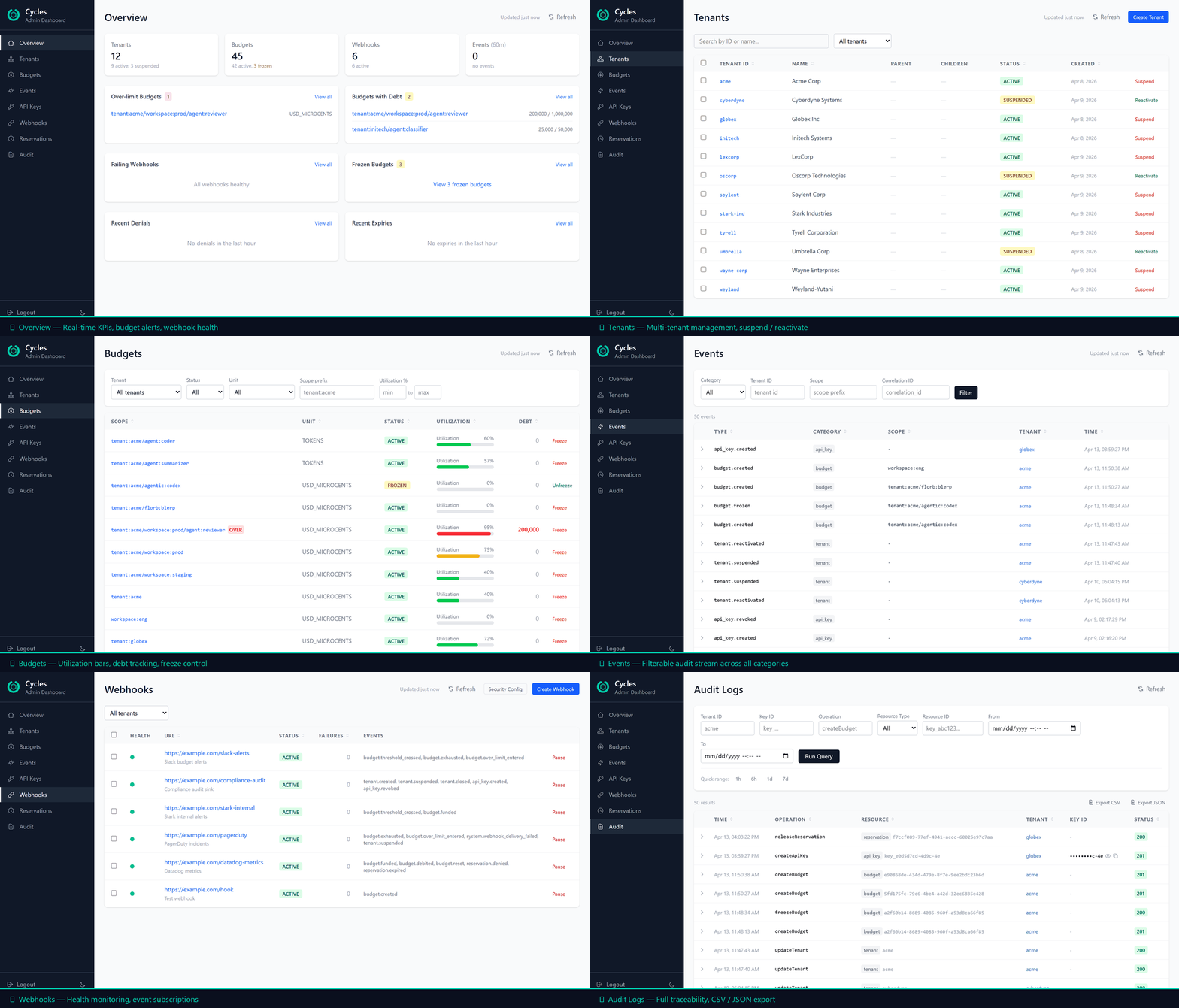
End-to-end walkthrough of the main operator flows
When to deploy the dashboard
If you only need SDK integration (Python, TypeScript, Spring, Rust, MCP), you can skip this page — the dashboard is optional. Deploy it when you want a UI for day-two operations: investigating events, freezing a runaway budget, rotating API keys, replaying missed webhooks, or force-releasing hung reservations during an incident.
What you get
A single pane for all operator tasks, capability-gated by the admin key:
| Page | Purpose |
|---|---|
| Overview | Single-request aggregated health dashboard — entity counts, top offenders, failing webhooks, over-limit scopes |
| Tenants | Tenant list + detail with budgets, API keys, and policies tabs |
| Budgets | Tenant-scoped budget list with utilization/debt bars; inline RESET and RESET_SPENT |
| Events | Correlation-first investigation tool with expandable detail rows |
| API Keys | Cross-tenant key list with masked IDs, permissions, status filters |
| Webhooks | Subscription health (green/yellow/red) + delivery history, replay, test |
| Reservations | Hung-reservation force-release during incident response (runtime-plane admin-on-behalf-of), with "View evidence" links when the runtime server emits evidence refs |
| Evidence | Retrieve and inspect a signed evidence envelope by id; resolve the signer against the runtime server's published JWK Set |
| Audit | Compliance query tool with CSV/JSON export |
Incident-response actions (freeze budget, suspend tenant, revoke API key, pause webhook, force-release reservation, emergency tenant-wide freeze) are one-click with confirmation and blast-radius summaries.
Power-user features (v0.1.25.24+)
- Command palette — press
Cmd+Kon macOS orCtrl+Kon Linux/Windows to jump to any tenant, budget, webhook, or API key by ID or name. The palette also exposes the common incident actions without navigating. - Bulk action lanes — the Tenants and Webhooks pages expose a filter-then-bulk workflow that maps onto the admin bulk endpoints (
POST /v1/admin/tenants/bulk-action,POST /v1/admin/webhooks/bulk-action). The UI surfaces theexpected_countsafety gate, the 500-matchLIMIT_EXCEEDEDceiling, and per-row succeeded/failed/skipped results. - Tenant hierarchy breadcrumbs — detail pages show
tenant → workspace → app → workflowso operators can navigate back up the scope path without losing context. - RESET_SPENT inline funding — the Budgets page exposes
RESET_SPENTalongsideRESET, clearingspentfor a new billing period without disturbingreserved/debt. Matches the server-side funding operation added incycles-server-adminv0.1.25.18.
Architecture
The dashboard is a static SPA served by nginx. It talks to two backends — the governance plane (cycles-server-admin) for tenants, budgets, policies, webhooks, events, and audit; and the runtime plane (cycles-server) for reservation force-release during incident response. Both are reverse-proxied through the dashboard's own nginx so the browser sees everything as same-origin and CORS is not involved in a standard production deployment.
The default path (left branch) carries the governance/admin pages. The split path (right branch) carries runtime-plane Reservations and Evidence calls, including force-release, evidence lookup, and signer JWKS resolution.
The nginx routing split in default.conf.template (the TLS variant is nginx-ssl.conf.example):
| Request path | Upstream | Used by |
|---|---|---|
/v1/reservations*, /v1/evidence*, /v1/.well-known/cycles-jwks.json | cycles-server:7878 | Reservations and Evidence pages — force-release, envelope lookup, signer-key resolution |
/v1/* (everything else) | cycles-admin:7979 | All other dashboard pages |
Both backends authenticate the same X-Admin-API-Key header. On the runtime plane, force-release is an admin-on-behalf-of call — the runtime server validates the admin key and records the actor in the audit trail.
Quick start (development)
For local development against a running admin server:
git clone https://github.com/runcycles/cycles-dashboard.git
cd cycles-dashboard
npm install
npm run dev
Dashboard opens at http://localhost:5173. The Vite dev server mirrors the production routing split:
/v1/reservations*,/v1/evidence*,/v1/.well-known/cycles-jwks.json→localhost:7878(cycles-server— runtime plane)/v1/*(everything else) →localhost:7979(cycles-admin— governance plane)
You need both backends running. See Deploy the Full Stack to bring them up — or cd ../cycles-server-admin && ADMIN_API_KEY=your-key docker compose up -d if you only want admin + Redis and plan to run cycles-server separately. Log in with the same ADMIN_API_KEY you set on the servers (both admin and runtime must share the same key for force-release to work).
CORS for dev mode
If the admin or runtime server rejects your dev browser with a CORS error, set DASHBOARD_CORS_ORIGIN=http://localhost:5173 on both containers. (In production with the nginx reverse proxy, CORS is not needed — the dashboard's nginx makes every backend call same-origin.)
Production (Docker + Caddy)
Recommended production setup uses Caddy for automatic HTTPS. Only ports 443 and 80 are exposed; admin server and Redis stay on the internal Docker network.
# docker-compose.prod.yml
services:
  caddy:
    image: caddy:2-alpine
    restart: unless-stopped
    ports:
      - "443:443"
      - "80:80"
    volumes:
      - ./Caddyfile:/etc/caddy/Caddyfile
      - caddy-data:/data
    depends_on:
      - dashboard
    networks:
      - cycles

  dashboard:
    image: ghcr.io/runcycles/cycles-dashboard:0.1.25.85
    restart: unless-stopped
    # No exposed ports — only reachable through Caddy.
    environment:
      ADMIN_UPSTREAM: ${ADMIN_UPSTREAM:-http://cycles-admin:7979}
      RUNTIME_UPSTREAM: ${RUNTIME_UPSTREAM:-http://cycles-server:7878}
    depends_on:
      cycles-admin:
        condition: service_healthy
      cycles-server:
        condition: service_healthy
    networks:
      - cycles

  # Runtime plane — reservation force-release, evidence lookup, and signer JWKS
  # go here via /v1/reservations*, /v1/evidence*, and
  # /v1/.well-known/cycles-jwks.json.
  # Its ADMIN_API_KEY must match cycles-admin's so admin-on-behalf-of calls
  # authenticate on both sides.
  cycles-server:
    image: ghcr.io/runcycles/cycles-server:0.1.25.59
    restart: unless-stopped
    environment:
      REDIS_HOST: redis
      REDIS_PORT: 6379
      REDIS_PASSWORD: ${REDIS_PASSWORD:?REDIS_PASSWORD must be set}
      ADMIN_API_KEY: ${ADMIN_API_KEY:?ADMIN_API_KEY must be set}
      WEBHOOK_SECRET_ENCRYPTION_KEY: ${WEBHOOK_SECRET_ENCRYPTION_KEY:?WEBHOOK_SECRET_ENCRYPTION_KEY must be set}
      DASHBOARD_CORS_ORIGIN: ${DASHBOARD_ORIGIN:-https://admin.example.com}
    healthcheck:
      test: ["CMD", "wget", "--spider", "-q", "http://localhost:7878/actuator/health/readiness"]
      interval: 10s
      timeout: 5s
      retries: 3
      start_period: 30s
    depends_on:
      redis:
        condition: service_healthy
    networks:
      - cycles

  # Governance plane — tenants, budgets, policies, webhooks, events, audit.
  cycles-admin:
    image: ghcr.io/runcycles/cycles-server-admin:0.1.25.55
    restart: unless-stopped
    environment:
      REDIS_HOST: redis
      REDIS_PORT: 6379
      REDIS_PASSWORD: ${REDIS_PASSWORD:?REDIS_PASSWORD must be set}
      ADMIN_API_KEY: ${ADMIN_API_KEY:?ADMIN_API_KEY must be set}
      WEBHOOK_SECRET_ENCRYPTION_KEY: ${WEBHOOK_SECRET_ENCRYPTION_KEY:?WEBHOOK_SECRET_ENCRYPTION_KEY must be set}
      WEBHOOK_SECRET_ALLOW_PLAINTEXT: "false"
      DASHBOARD_CORS_ORIGIN: ${DASHBOARD_ORIGIN:-https://admin.example.com}
      EVENT_TTL_DAYS: ${EVENT_TTL_DAYS:-90}
      DELIVERY_TTL_DAYS: ${DELIVERY_TTL_DAYS:-14}
    healthcheck:
      test: ["CMD", "wget", "--spider", "-q", "http://localhost:7979/actuator/health/readiness"]
      interval: 10s
      timeout: 5s
      retries: 3
      start_period: 30s
    depends_on:
      redis:
        condition: service_healthy
    networks:
      - cycles

  # Async webhook delivery and optional CyclesEvidence signing.
  cycles-events:
    image: ghcr.io/runcycles/cycles-server-events:0.1.25.25
    restart: unless-stopped
    environment:
      REDIS_HOST: redis
      REDIS_PORT: 6379
      REDIS_PASSWORD: ${REDIS_PASSWORD:?REDIS_PASSWORD must be set}
      WEBHOOK_SECRET_ENCRYPTION_KEY: ${WEBHOOK_SECRET_ENCRYPTION_KEY:?WEBHOOK_SECRET_ENCRYPTION_KEY must be set}
      # Evidence signing is off unless these are set consistently with cycles-server:
      # EVIDENCE_SERVER_ID, EVIDENCE_SIGNING_SIGNER_DID,
      # EVIDENCE_SIGNING_PRIVATE_KEY_HEX.
    depends_on:
      redis:
        condition: service_healthy
    networks:
      - cycles

  redis:
    image: redis:7-alpine
    restart: unless-stopped
    environment:
      REDIS_PASSWORD: ${REDIS_PASSWORD:?REDIS_PASSWORD must be set}
    command: ["sh", "-c", "redis-server --appendonly yes --requirepass \"$${REDIS_PASSWORD}\""]
    volumes:
      - redis-data:/data
    healthcheck:
      test: ["CMD-SHELL", "redis-cli -a \"$${REDIS_PASSWORD}\" ping"]
      interval: 5s
      timeout: 3s
      retries: 5
    networks:
      - cycles

volumes:
  redis-data:
  caddy-data:

networks:
  cycles:
Both backends required
The dashboard's nginx routes /v1/reservations*, /v1/evidence*, and /v1/.well-known/cycles-jwks.json to cycles-server:7878. If you omit cycles-server, every governance page works but Reservations and Evidence fail with a 502. The ADMIN_API_KEY must be the same on both cycles-admin and cycles-server — admin-on-behalf-of force-release calls authenticate on both sides. Signed evidence also requires cycles-server-events to run with the matching evidence private key.
# Caddyfile
admin.example.com {
    reverse_proxy dashboard:80
}
Deploy:
# Generate the secrets into shell variables first. Do NOT write the
# $(openssl ...) calls inside a quoted heredoc — the command substitution
# would never run, and every deployment would use the literal string
# "$(openssl rand -base64 32)" as its key.
ADMIN_API_KEY="$(openssl rand -base64 32)"
REDIS_PASSWORD="$(openssl rand -base64 32)"
WEBHOOK_SECRET_ENCRYPTION_KEY="$(openssl rand -base64 32)"

cat > .env <<EOF
ADMIN_API_KEY=$ADMIN_API_KEY
REDIS_PASSWORD=$REDIS_PASSWORD
WEBHOOK_SECRET_ENCRYPTION_KEY=$WEBHOOK_SECRET_ENCRYPTION_KEY
EOF

docker compose -f docker-compose.prod.yml up -d
Open https://admin.example.com, log in with the generated ADMIN_API_KEY.
Admin API key is the only credential
The dashboard uses X-Admin-API-Key exclusively for authentication. There is no user login, no SSO out of the box. Treat the admin key as a root credential — rotate it regularly, store it in a secrets manager, and consider placing the dashboard behind SSO or VPN for defense in depth.
Authentication and session handling
- User enters the admin API key on the login page.
- Dashboard calls
GET /v1/auth/introspectto validate and retrieve capabilities. - Sidebar navigation is gated by capability booleans (
view_overview,view_budgets, etc.) — the admin server decides what's visible. - On 401/403 from any API call, the session is cleared and the user is redirected to login.
- Key is stored in
sessionStorage— survives page refresh, cleared on tab/browser close. Never written tolocalStorageor cookies. - Session idle timeout (30 min) and absolute timeout (8 h) enforced client-side, checked every 15 s.
- Login rate limiting — exponential backoff after 3 failed attempts (5 s → 10 s → 20 s → 40 s → 60 s cap).
Polling cadence
Each page manages its own polling lifecycle via a usePolling composable. Intervals are tuned per page — most default to 60 s; Events polls more aggressively, Audit not at all.
| Page | Interval | Behaviour |
|---|---|---|
| Overview | 30 s | Pause on tab hidden, 2× backoff on error (max 5 min) |
| Events | 15 s | Same |
| Budgets | 60 s | Same |
| Webhooks | 60 s | Same |
| Tenants | 60 s | Same |
| Audit | Manual only | Explicit "Run Query" button |
Hardening checklist
- Never expose ports 7878, 7979, or 6379 to the public internet. Only the TLS proxy (443/80) should be reachable; the runtime, admin, and Redis containers must stay on the internal Docker network.
- HTTPS only — the admin key is sent on every request. Caddy or a load balancer with TLS 1.2+ in front.
- Rotate the admin key periodically (
openssl rand -base64 32). - Set
REDIS_PASSWORD— the default has no authentication. - Store secrets in a secrets manager (Vault, AWS Secrets Manager, etc.), not in git or
.envfiles committed to the repo. - Subresource Integrity (SRI) hashes are baked into all production assets via
vite-plugin-sri-gen. - The default
default.conf.templateships withX-Frame-Options: DENY,X-Content-Type-Options: nosniff, CSP, Permissions-Policy, andserver_tokens off. The TLS variant (nginx-ssl.conf.example) adds HSTS.
Monitoring
- Admin server exposes
/actuator/health/livenessand/actuator/health/readiness— use those for probes. The aggregate/actuator/health(like/actuator/prometheus) requires theX-Admin-API-Keyheader. GET /v1/admin/overviewis a good synthetic monitoring target — if it returns 200, the full stack (Redis + admin + auth) is working.- Alert on the overview payload's
failing_webhooksandover_limit_scopesarrays. - For deeper metric-based alerting, see Observability Setup and Monitoring and Alerting.
Environment variables
| Variable | Required | Default | Description |
|---|---|---|---|
ADMIN_API_KEY | Yes | — | Admin API key for X-Admin-API-Key. Must be the same value on cycles-admin and cycles-server — admin-on-behalf-of calls (force-release reservation) authenticate on both. |
REDIS_PASSWORD | Recommended | (empty) | Redis authentication password |
WEBHOOK_SECRET_ENCRYPTION_KEY | Yes | — | AES-256-GCM key for webhook signing secrets at rest; required by the admin and events services unless their explicit local-development plaintext escape hatch is enabled |
DASHBOARD_CORS_ORIGIN | Dev only | http://localhost:5173 | CORS origin — only needed when the browser calls the admin server directly (dev mode); unused in standard production |
ADMIN_UPSTREAM | No | http://cycles-admin:7979 | Governance-plane upstream for the dashboard container's nginx proxy |
RUNTIME_UPSTREAM | No | http://cycles-server:7878 | Runtime-plane upstream for reservations, evidence lookup, and signer JWKS |
EVIDENCE_SERVER_ID / EVIDENCE_SIGNING_SIGNER_DID | Evidence only | (empty) | Backend identity values required on both cycles-server and cycles-events for signed evidence |
EVIDENCE_SIGNING_PRIVATE_KEY_HEX | Evidence only | (empty) | Backend private Ed25519 signing seed. Set only on cycles-events; never set on the dashboard or runtime server |
EVIDENCE_SIGNING_KID | Evidence JWKS only | derived | Public JWK kid label for the runtime server's signer JWKS. Not key material and not read by cycles-events |
The dashboard itself has no application-level server configuration — it's a static SPA. The backend URLs are set by the proxy:
- Development: Vite proxy in
vite.config.ts(defaults:localhost:7979admin,localhost:7878runtime). - Production:
ADMIN_UPSTREAMandRUNTIME_UPSTREAMon the dashboard container's nginx proxy.
Next steps
- Deploy the Full Stack — bring up admin + runtime + events alongside the dashboard
- Admin API reference — the endpoints the dashboard calls
- Observability Setup — Prometheus scrape +
cycles_*metrics - Monitoring and Alerting — alert rules using the
cycles_*counters
Source
- Repository:
runcycles/cycles-dashboard - Image:
ghcr.io/runcycles/cycles-dashboard - Stack: Vue 3 + TypeScript + Vite, Pinia, Vue Router, Tailwind CSS v4. Tests: Vitest (unit) + Playwright (E2E against the live compose stack).
- License: Apache 2.0